


AI in education reduces workload, automates repetitive processes, saves time, and increases ROI as well as overall experience for the faculty and students alike. Here, we’ll discuss how to convert textbooks into practice questions using powerful AI question generation tools.
Artificial intelligence can be used in varied ways in education. From AI-powered LMS (learning management systems) to AI question generation tools, AR and VR devices, personalized learning, etc., advanced technologies are transforming the industry in various ways.
Statistics show that the AI education market will increase by $7.57 billion in 2025 from last year’s (2024) $5.47 billion. This represents a significant 38.4% annual growth rate, indicating the increasing adoption of artificial intelligence technologies in the education market. Additionally, according to the World Economic Forum, the global AI education market is expected to touch $112.3 billion by 2034.
AI-based assessment tools continue to be one of the most implemented solutions due to the ease of use and time-saving advantages. The faculty doesn’t have to spend several hours going through hundreds of pages in a textbook to identify important chapters and create questions from the text. The process can be automated with platforms like PrepAI, offering seamless solutions to convert textbooks into practice questions.
Let’s read more about how to create automated question papers in this blog.
Easy Steps to Use PrepAI for Converting Textbooks to Practice Questions
PrepAI is an AI question generation platform that helps save around 10 hours per week per faculty. It has been developed to be user-friendly, quick, and efficient in creating assessments from multiple devices. With this NLP-powered (natural language processing) solution, you can easily convert a textbook into test papers or practice questions.
Here are the steps to follow:
- Go to the PrepAI website: https://www.prepai.io/in/
- Create a new account by clicking the Sign Up button, or log in to your existing account using the Log In button. Both are available at the top right corner of the page.
- Provide the input credentials to access your account. The interface will appear like this:
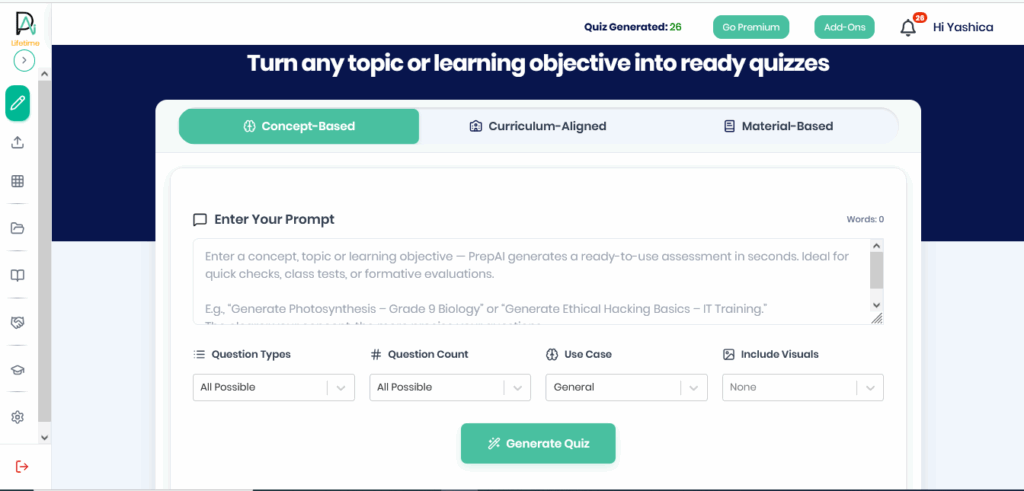
- Click on the Material-Based tab to access the various input options. This platform creates AI-powered formative assessments, summative assessments, quizzes, practice tests, competitive exams, cognitive learning-based assessments, and much more.
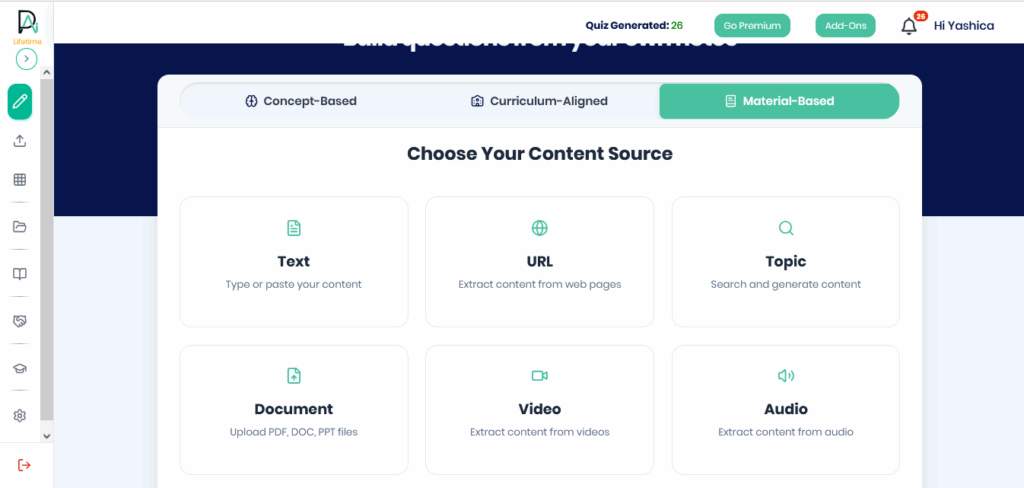
- To convert a textbook into a question paper, select the Document option. It supports PDFs, PPTs, and Word documents.
- A new interface will open on the screen. Click on the ‘Click to Browse’ option or drag and drop the relevant softcopy of the textbook into the box. This is the input you provide to create an AI generated question paper.
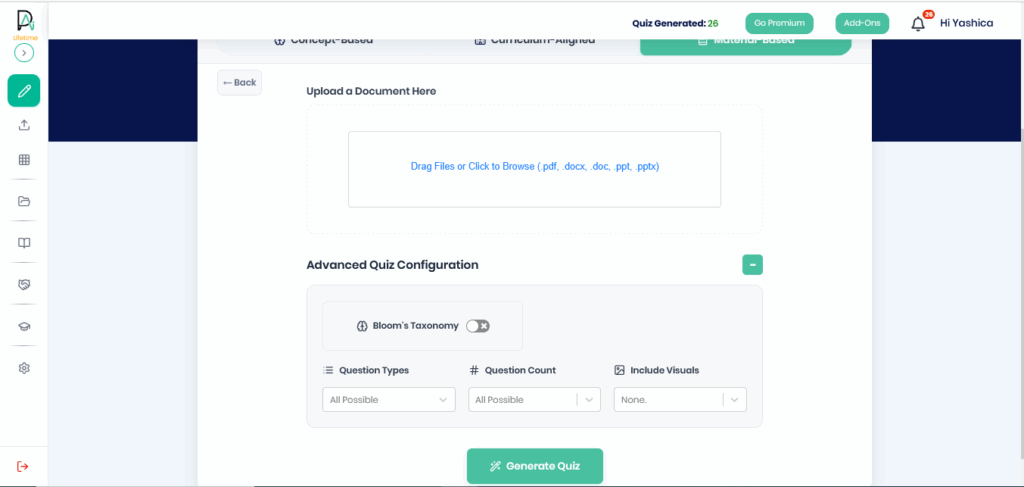
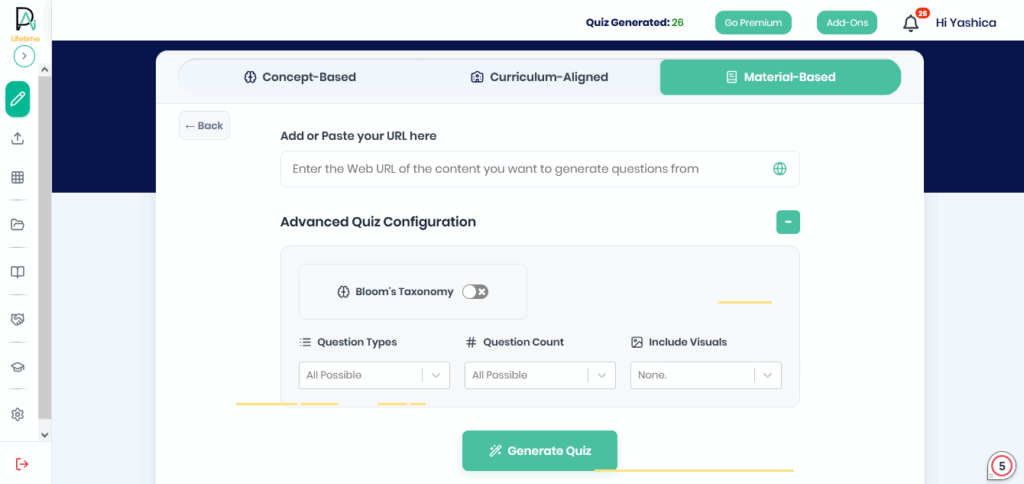
- Then, look at the advanced quiz configuration settings. Here, you can activate Bloom’s Taxonomy framework by sliding the toggle to the right. You can also select the levels to include in the test paper. Bloom’s Taxonomy has six levels of learning (remember, understand, apply, analyze, evaluate, create). The default option is to generate questions for all levels.
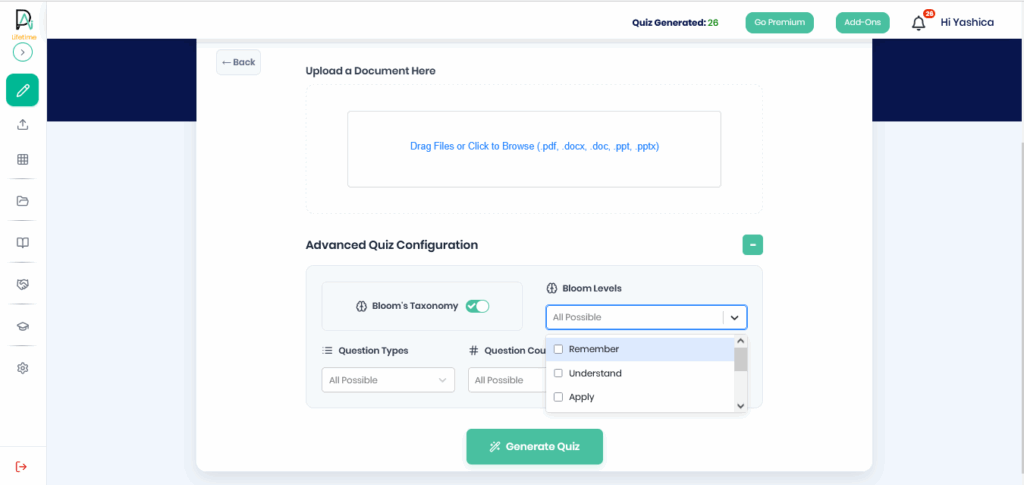
- Next, select the question type (MCQs and descriptive), number of questions, and the type of visuals (diagrams, graphs, tables) to include in the question paper. The default setting is ‘all possible’ for these. So, leave them untouched if you want a more diverse set of questions.
- Then, click the Generate Quiz button and wait for a few seconds as PrepAI works its magic in the background to generate practice questions from the textbook content.
- What if the textbook is available only online and cannot be downloaded? Instead of selecting the Document option, click the URL on the content source interface. Then, copy and paste the link to the textbook and follow the same steps as above for the advanced settings.
Once the questions are ready, they can be edited as required. You can manually add and delete questions as well. The answers (AI-generated) can be changed if required. This ensures that the faculty retains control over the test paper even when the process is automated.
By providing feedback to the platform, you can train the algorithm to create questions aligned with your specifications.
Check out this video for a visual tutorial.
The Benefits of Using an AI Question Generation Tool
Next-gen learning with AI is no longer a distant dream for the future. It is here and has already become integral to many schools, colleges, and universities in different ways. Educational institutions that embrace AI can gain a competitive edge over those that don’t.
Save Time
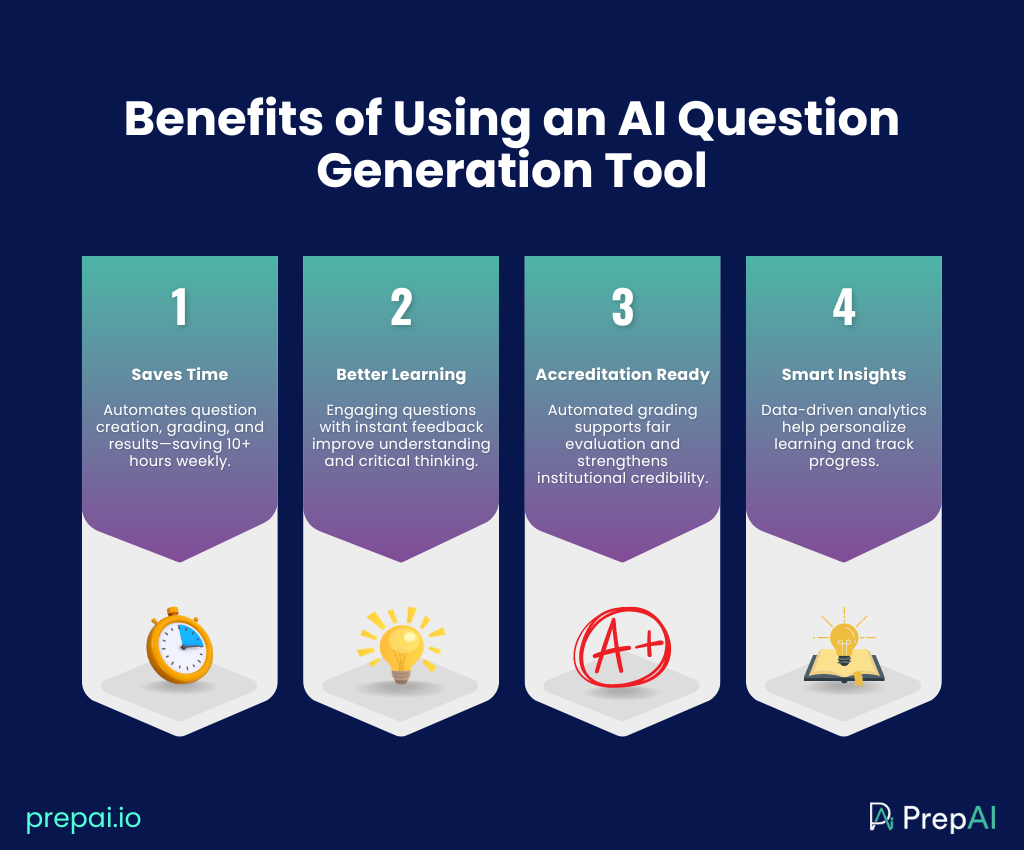
Time is the biggest factor in today’s fast-paced world. Overworked faculty need a breather from continuously performing the same teaching and non-teaching activities. By automating question paper creation with PrepAI, they can save 10+ hours per week. That’s because the platform also grades the submitted answers and shares instant results. No need to manually create the tests or evaluate the answer sheets.
Better Learning Outcomes
AI and assessment in education are not only useful for the institution, but also help students improve their learning outcomes and experience. AI-generated question papers are engaging and ensure students stay focused throughout. By providing instant results after submission, the platforms also help students learn from the process, identify where they went wrong, and correct the mistakes. PrepAI’s Bloom’s Taxonomy framework helps support critical thinking abilities in students.
Accreditation Compliance
PrepAI has accreditation compliance, which allows educational institutions to create better and more transparent assessment standards. By automating the grading process, you eliminate the risk of subconscious bias and prejudice that could affect a student’s grade and future. Moreover, the accreditation gives the institution a better branding and makes it stand apart from others in the market.
Analytics and Insights
The benefit of using AI for education is access to data-driven insights about students and their learning abilities. The faculty can combine their personal experience and observations with the data-driven insights to guide each student by empowering them for a 360-degree development.
Final Words
AI question generation tools are not just helpful but mandatory to save time for faculty without compromising quality. From accreditation compliance to improving learning outcomes by around 20% and ensuring better transparency and scalability, platforms like PrepAI can revamp the assessment model to align with the establishment’s requirements.
Book a workshop with our experts to understand the various ways to use PrepAI effectively for creating high-quality assessments in your educational institution. Talk to us today! We invite professors to explore education-focused insights, discussions, and AI-driven assessment ideas within the PrepAI Community.
FAQs
1. Can I choose selected chapters and sections from the textbook for AI question generation?
Yes, you can choose which chapters and sections to use from the textbook to create questions using the AI question generator. This can be done by copying the required content into a different document or directly pasting it into the interface by selecting the ‘Text’ input option on PrepAI.
2. How many practice questions can I create using the AI assessment tools?
There is no limit to the number of practice questions that can be created using AI assessment tools. With PrepAI’s Lifetime Plan, users can generate unlimited questions and test papers and also conduct unlimited tests online through the same interface. It depends on your usage requirements.
3. Can the questions be repurposed to create more test papers using the AI question generator?
Yes, absolutely! With PrepAI, the practice questions created by the tool can be repurposed and reused to generate more test papers. This can be done by clicking on the My Quiz option in the left panel to access the previously generated tests. Select the relevant question paper to view/ edit/ download/ conduct the test, etc., as required.
