


Teachers no longer have to spend hours manually converting their lessons into assessments. Here, we’ll discuss how to turn any lecture notes into question papers in less than five minutes using an AI-powered assessment platform.
Lectures are a huge part of education, be it in the physical classroom or online lessons. The faculty makes notes for each lecture, which help them in structuring the lesson and explaining the concepts to students. Do you know that these notes can be directly converted into question papers for various assessments?
All you need is a powerful AI-powered assessment platform to generate high-quality quizzes from lecture notes in a few minutes. It is a straightforward and effective solution for teachers to save time while ensuring quality assessments. Moreover, the AI assessment platform can be integrated with existing systems, making it a worthy addition to the institution. With a majority of the students already using AI, schools and colleges should embrace the technology and benefit from it.
Statistics show that the AI education market is likely to be $7.57 billion by the end of 2025, showing a growth rate of 38.4% compared to last year. Some reports claim that the growth rate can be as much as 41.4% between 2025 and 2029 as more educational institutions embrace and adopt AI technologies. But how do you transform study material into assessments using artificial intelligence? Let’s find out in this blog.
Steps to Turn a Lecture Note into an Assessment
With the right technology at your fingertips, it is very easy to transform study material into assessments, that too, under five minutes! AI and assessments in education go hand in hand in today’s world. Modern educational institutions can save over ten hours per week per faculty and improve the learning outcomes by around 20% by adopting AI solutions like PrepAI. The platforms are designed to provide user-friendly, reliable, transparent, and consistent outcomes on scale.
Here’s how to turn the lecture notes into assessments using PrepAI:
Go to the PrepAI website and sign up to create a new account or click on Login to access your existing account: https://www.prepai.io/in/
Once you enter your login credentials, you can see the interface.
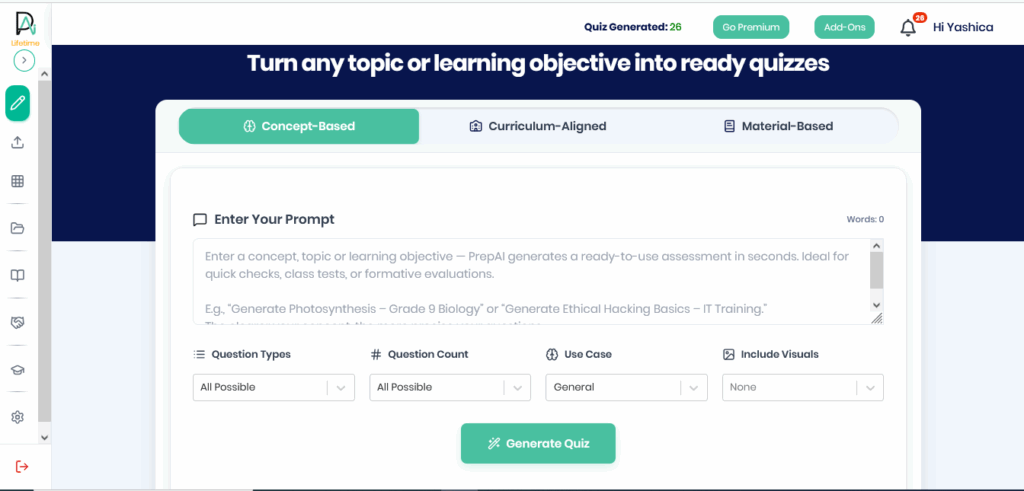
Click on Material-Based to provide the lecture notes as input to the platform.
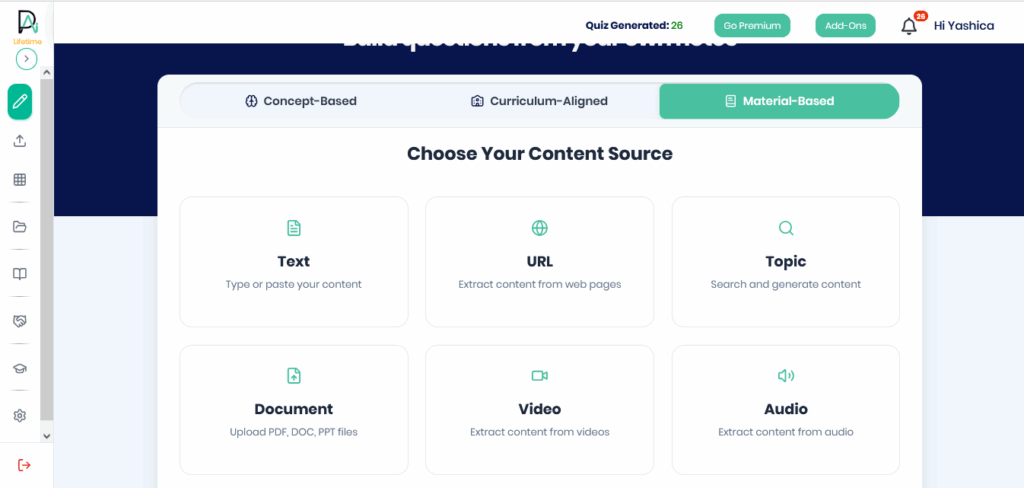
Select the appropriate input method. You can copy-paste the notes as text or upload them as a file (MS Word, PDF, PPT).
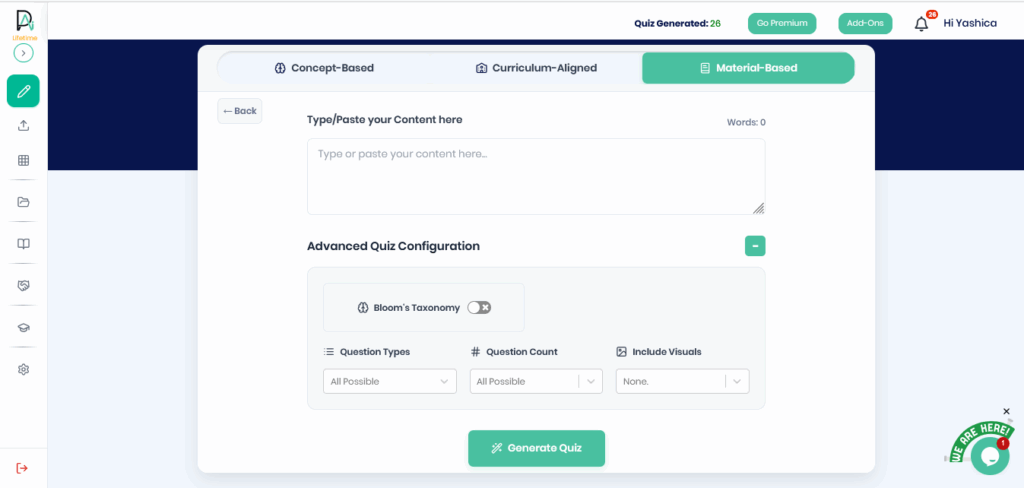
The use of machine learning in assessments makes it possible to create contextual questions from the provided input. Additionally, you can slide the toggle to turn on Bloom’s Taxonomy, which generates questions that align with six levels of learning.
Once done, select the question types, question count, and visuals to be auto-generated with the questions.
Being a powerful AI question generator for teachers, PrepAI can create diverse questions, such as descriptive, multiple choice, fill-ups, true/ false, matching, and crossword.
The MCQs are further expanded into three difficulty levels: easy, medium, and hard.
Click the Generate Quiz button once you provide the input details. You can leave the settings in default to create an assessment with all possible questions, types, and visuals.
The question paper will be ready in a few minutes as the AI-powered assessment platform works its magic to convert the input content into questions.
The generated questions and answers can be edited to ensure they align with your specifications. You can also add questions manually or delete unwanted ones.
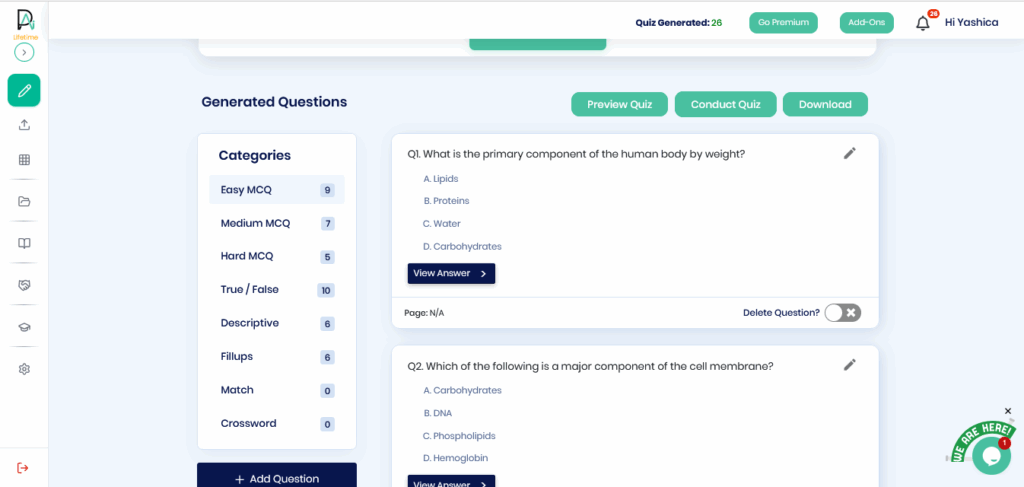
When the assessment is as per your standards, preview it to ensure everything is error-free and finalize the copy.
You can then conduct the tests online through the same AI-based assessment tools or download the question paper and answer key for offline tests.
For online tests, the submissions are auto-graded to share instant results with students.
Moreover, the faculty can access the analytical insights from the same interface to know about students’ performance in the test.
Role of PrepAI in Creating High-Quality Assessments
PrepAI is an NLP-based (natural language processing) assessment platform and a faculty-readiness solution with a powerful algorithm, great customization, scalability, and mobile-responsiveness.
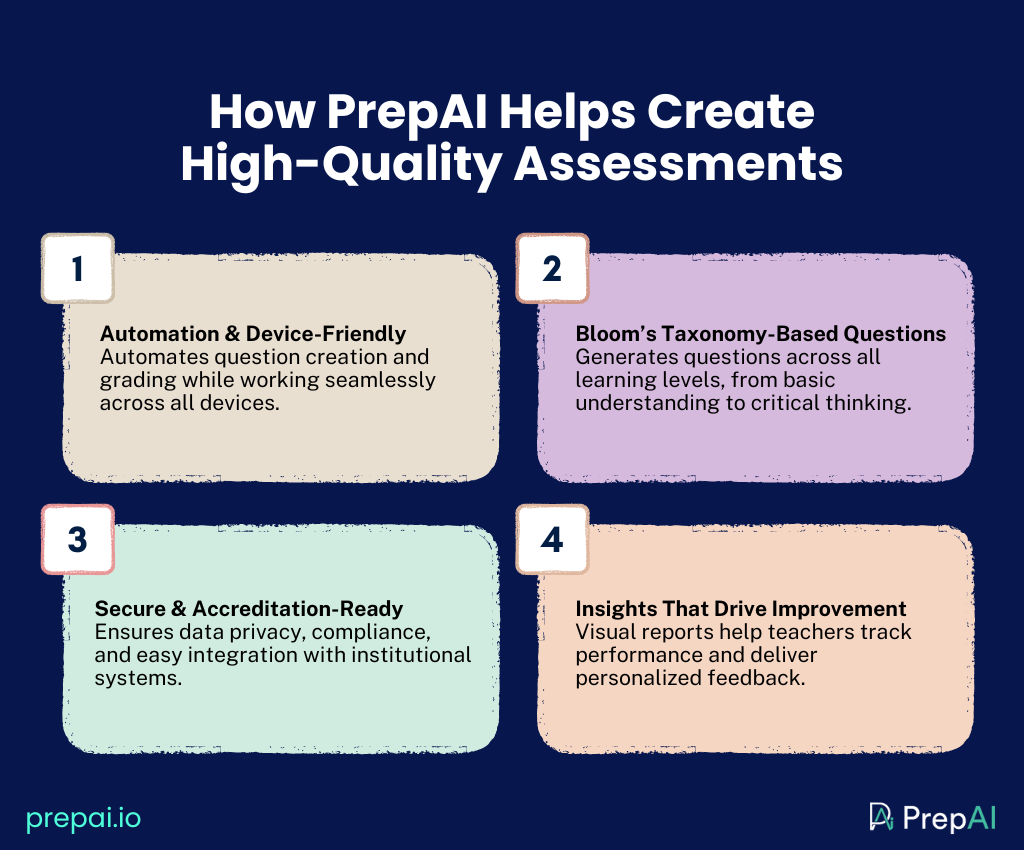
So, what role does PrepAI play in creating high-quality assessments? Let’s find out below:
Automation and Mobile-Responsive
The biggest advantage of implementing an AI question paper generator is the automation, where the process of converting input content into questions and grading the submitted answers to provide instant results saves several hours for teachers. In fact, with PrepAI, each faculty can save over ten hours per week. Additionally, the solution works seamlessly on smartphones and tablets as well as desktops and laptops. This makes it a go-to choice for educators.
Bloom’s Taxonomy Support
Bloom’s Taxonomy is an educational framework that classifies learning into six levels: remembering, understanding, applying, analyzing, evaluating, and creating. They progress from lower-order to higher-order thinking skills, thus measuring various abilities of students to help them improve on multiple levels. PrepAI is supported by Bloom’s Taxonomy framework, making it an effective AI-powered assessment platform to generate questions for cognitive-based assessments, critical thinking, and more.
Accreditation Compliance
Data security, regulatory compliance, data privacy, encryption, transparency, etc., are some vital factors to consider when selecting an AI assessment platform. With PrepAI, educational institutions can seamlessly integrate the tool into their existing systems and ensure accreditation compliance. This increases parent and student satisfaction as well as the institution’s brand value. It also gives a competitive edge by attracting more like-minded students and faculty.
Analytics and Insights
Data-driven insights are valuable as faculty can combine these with their experienced observations to guide students in their careers and personal lives. PrepAI has built-in analytics, and the insights can be accessed directly from the user dashboard. The graphical reports provide teachers with the required data-driven support to share personalized feedback with students after each assessment.
Final Words
Using an AI assessment platform to turn a lecture note into an assessment has many benefits. Faculty can save time and reduce workload while creating quality exams that efficiently evaluate students’ knowledge and learning abilities.
By partnering with a reputable AI-powered assessment platform like PrepAI, you can generate unlimited assessments around the clock and become a part of the PrepAI Community with experienced educators, teachers, instructors, etc. Schedule a meeting with our team to know more about the Community.
FAQs
1. Which AI assessment platform is convenient for converting a lecture into a question paper?
Among the various AI-powered assessment platforms, PrepAI is the most convenient for converting a lecture and its notes into a question paper. That’s because PrepAI supports text, file, audio, video, and URLs as input. This versatility makes it a worthy choice for faculty to quickly generate assessments at any time and from diverse devices.
2. Can video lessons be turned into exam questions using AI?
Yes, video lessons and lectures can be turned into exam questions using an AI-powered assessment platform like PrepAI. Upload the video to the interface or enter the link. You can also select the start and end timestamps for the tool to convert only that portion of the video into questions. Additionally, you can select the question type, number of questions, and whether to include visual content like diagrams, pictures, tables, charts, etc.
3. Can multiple assessments be created from the same lecture notes?
Yes. Multiple assessments can be created from the same lecture notes with AI-based assessment tools like PrepAI. The same input content can be used to generate different versions of question papers. You can also use the Quiz Multiplier feature to create bulk assessments for the same lecture notes.
